
Estate Technology Design
Enterprise‑Grade Estate Infrastructure
The network is the invisible backbone of every modern estate. Peters Audio Video designs secure, scalable, enterprise‑grade network infrastructure that supports automation, entertainment, security, and remote connectivity — engineered with professional documentation for architects and builders.
Schedule a Design ConsultationUnderstanding Estate Networking
Why Your Luxury Home Needs Enterprise-Grade Networking
Enterprise-grade home networking is the application of commercial network engineering principles to residential estates. Unlike consumer mesh routers that struggle with 20+ devices, enterprise infrastructure uses managed switches, hardwired access points, and VLAN segmentation to reliably support the 100-300+ connected devices found in modern luxury homes.
Every technology system in your estate depends on the network: Savant automation controllers, security cameras, distributed audio endpoints, lighting keypads, streaming devices, and smart appliances all compete for bandwidth. Without proper network architecture, the result is buffering, dropped connections, and unreliable automation — unacceptable in a luxury environment.
Our network designs follow the same engineering rigor as commercial IT installations: documented rack layouts, cable schedules, VLAN configurations, and QoS (Quality of Service) policies that prioritize real-time traffic like security cameras and automation commands over background downloads. Every installation includes certified cable testing with documented results.
Infrastructure Design
Infrastructure Designed for Performance & Security
Without a properly engineered backbone, no automation or AV system can perform reliably. We design networks that eliminate dead zones, isolate IoT devices for security, and provide the bandwidth every system in your estate demands.
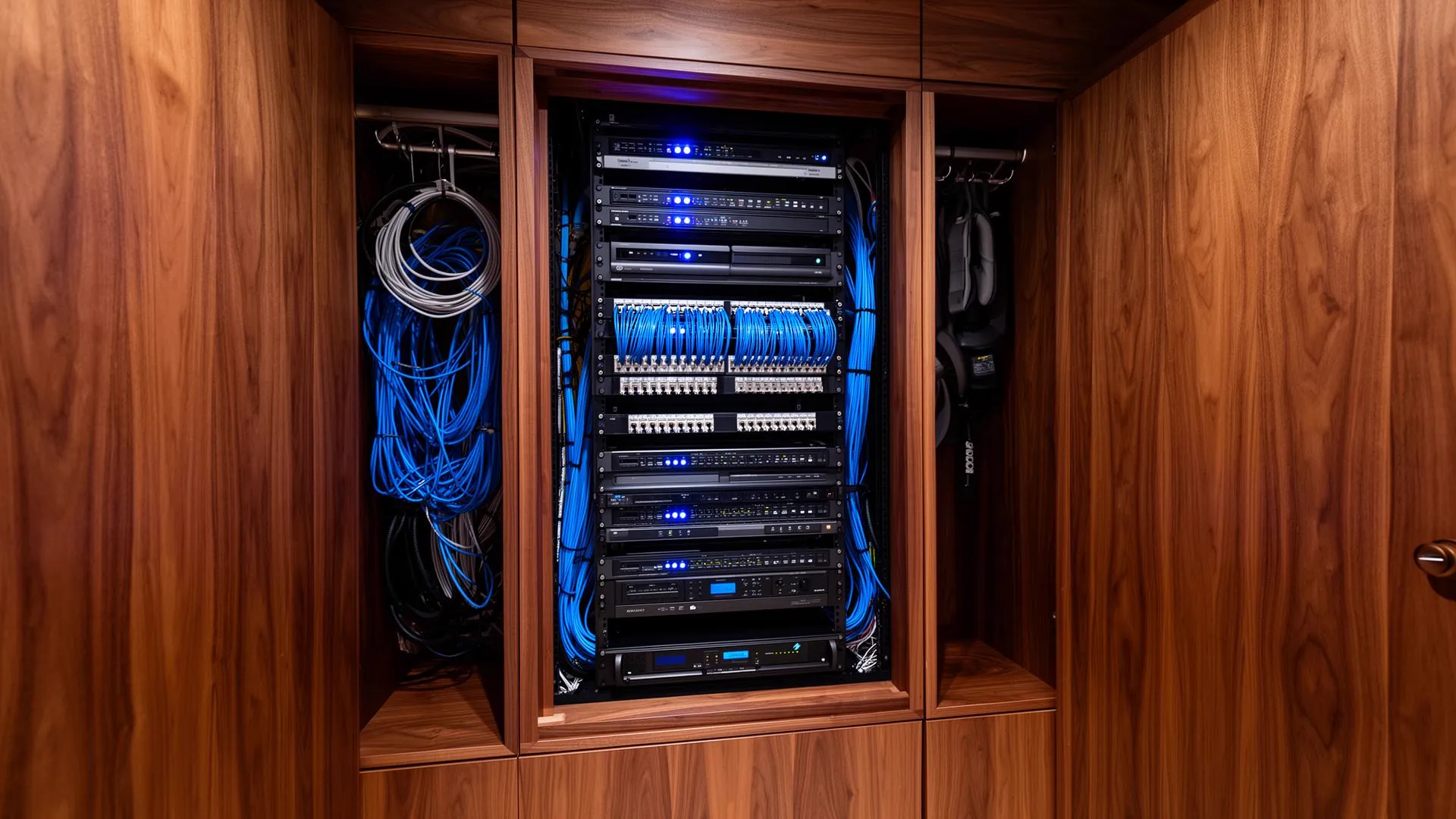
Structured Wiring & Rack Design
Organized, documented cable infrastructure with professionally engineered equipment racks, proper ventilation, and clean cable management — designed with professional schematics for your builder.
Enterprise Wi-Fi Architecture
Commercial-grade wireless access points providing seamless roaming coverage across expansive estates, outdoor areas, and multi-structure properties — hardwired, not mesh.
Cybersecurity & Network Design
VLAN segmentation isolates IoT devices, security cameras, and automation from personal devices. Firewall configuration and VPN access for secure remote estate management.
Technology Stack
Network Technology Stack
Pakedge, Araknis, Cisco Meraki
Managed Layer 3 switches with VLAN support, QoS prioritization, and remote management for reliable device segmentation
Ruckus, Araknis, Access Networks
Enterprise-grade Wi-Fi 6E/7 access points with seamless roaming, hardwired backhaul, and centralized management
Pakedge, Fortinet, pfSense
Next-generation firewalls with intrusion detection, content filtering, and VPN for secure remote access
Middle Atlantic, Strong, Sanus
Ventilated equipment racks with UPS backup, cable management, and professional labeling documentation
Belden, Mohawk, ICC
Cat6A structured wiring, fiber optic backbone, and certified cable testing for guaranteed performance
Investment Guide
Network Infrastructure Investment Ranges
Essential Infrastructure
$10,000 – $25,000Managed network with enterprise Wi-Fi, VLAN segmentation, and basic rack organization. Ideal for existing homes upgrading from consumer networking or new construction under 4,000 sq ft.
Estate Infrastructure
$25,000 – $50,000Full structured wiring, managed switching, enterprise Wi-Fi coverage (indoor and outdoor), professional rack engineering, VPN access, and remote monitoring. Our standard specification for luxury estates 5,000-10,000 sq ft.
Enterprise Estate Infrastructure
$50,000 – $75,000+Multi-structure connectivity (guest houses, pool cabanas, garages), fiber backbone, redundant ISP failover, advanced cybersecurity, and 24/7 remote monitoring. For estates demanding commercial-grade reliability.
Design Capabilities
Complete Network Engineering & Documentation
Wi-Fi Engineering
Wi-Fi Coverage Planning for Large Homes
Estate Wi-Fi coverage is planned at roughly one hardwired access point per 1,500 to 2,500 square feet, then adjusted for construction. Plaster with wire lath, stone, brick, foil-backed insulation, and low-E glass all attenuate signal, so dense-construction homes need more access points than square footage alone suggests.
| Home size | Frame construction | Stone, brick or plaster | Backbone |
|---|---|---|---|
| Up to 4,000 sq ft | 2–3 access points | 3–4 access points | Cat6A to each AP, 2.5G switch ports |
| 4,000–8,000 sq ft | 3–5 access points | 5–7 access points | Cat6A, multi-gig uplinks, single rack |
| 8,000–15,000 sq ft | 5–8 access points | 8–12 access points | Fiber between IDF closets, multi-gig core |
| 15,000+ sq ft or multi-building | 9+ access points | 12+ access points | Fiber backbone, distributed racks per building |
How We Engineer Estate Wi-Fi
- 01
Predictive survey from plans
Access point locations are modeled against floor plans, wall assemblies, and window specifications before rough-in, rather than guessed at after move-in.
- 02
Hardwire every access point
Each access point receives its own Cat6A run to the rack. No wireless backhaul, so throughput is not halved at each hop.
- 03
Plan channels and band steering
2.4 GHz, 5 GHz, and 6 GHz channels are assigned to avoid co-channel interference between your own access points and neighboring properties.
- 04
Segment traffic with VLANs
Family, guest, camera, automation, and building-systems traffic are separated so a compromised device cannot reach the rest of the estate.
- 05
Apply QoS policies
Real-time traffic such as camera streams, automation commands, and video calls is prioritized over background backups and downloads.
- 06
Certify and document
Every cable is tested to standard and the results, rack elevations, VLAN maps, and IP schedules are handed over as documentation you own.
- 07
Monitor remotely
Access points, switches, and the internet circuit are monitored so degradation is identified and resolved before the household notices it.
Wireless performance is decided by wiring, not by the router. Pathways and cable specification are established during low voltage rough-in and new construction planning. For local service, see estate networking in Charlotte.
Frequently Asked Questions
Why does a luxury estate need enterprise-grade networking?
Modern luxury estates operate 100+ connected devices — automation controllers, security cameras, streaming endpoints, smart appliances, and more. Consumer-grade routers cannot reliably support this density. Enterprise-grade infrastructure provides the bandwidth, segmentation, security, and management required for consistent performance across all technology systems.
What is structured wiring and why does it matter?
Structured wiring is a standardized approach to running data, audio, video, and control cables throughout an estate to a centralized equipment room. It provides a reliable backbone for all technology systems and allows for future expansion — we provide professional infrastructure plans comparable to MEP engineering documentation.
How much does estate network infrastructure cost?
Network infrastructure for a luxury estate typically ranges from $10,000 to $75,000+ depending on property size, number of cable drops, rack complexity, and equipment specification. Pre-construction planning with our infrastructure documentation significantly reduces costs compared to retrofit.
Can you redesign the network in an existing estate?
Yes. We regularly redesign networks in existing estates by adding managed switches, enterprise Wi-Fi access points, proper cable management, and network segmentation. Our design documentation identifies optimal infrastructure improvements for your property.
What is VLAN segmentation and why does my smart home need it?
VLAN (Virtual Local Area Network) segmentation isolates different device categories on separate logical networks. Your security cameras, IoT devices, automation controllers, and personal computers each operate on their own network segment. This prevents a compromised smart thermostat from accessing your personal files or security cameras — critical for estates with high-value assets and privacy requirements.
What is Wi-Fi 7 and should my estate have it?
Wi-Fi 7 (802.11be) delivers speeds up to 46 Gbps, reduced latency, and multi-link operation for seamless device connectivity. For luxury estates with 100+ wireless devices, Wi-Fi 7 access points provide the bandwidth headroom needed for 8K streaming, AR/VR, and real-time security feeds. We design Wi-Fi 7-ready infrastructure for all new construction projects to future-proof your investment.
How do you ensure reliable Wi-Fi across a large property?
We design enterprise-grade wireless coverage using commercial access points from Ruckus or Araknis, strategically placed based on RF site surveys. Each access point is hardwired (not mesh) for maximum reliability. Multiple APs provide seamless roaming across indoor areas, outdoor spaces, guest houses, and pool cabanas — with zero dead zones.
Can I access my home network securely when traveling?
Yes. We configure enterprise-grade VPN access that allows secure remote connectivity to your estate's automation, cameras, and network from anywhere in the world. All remote traffic is encrypted end-to-end. We also provide remote monitoring and management infrastructure that allows our team to proactively identify and resolve issues before you notice them.
How many Wi-Fi access points does a large home need?
Plan roughly one hardwired access point per 1,500 to 2,500 square feet of interior space, adjusted for construction. Plaster with wire lath, stone, brick, foil-backed insulation, and low-E glass all cut signal, so a 10,000 square foot stone estate can need eight or more access points where a 10,000 square foot frame house needs five. Outdoor living areas, guest houses, garages, and docks are counted separately.
Is Wi-Fi 7 worth installing in a luxury home?
Wi-Fi 7 is worth specifying on new installations because of the 6 GHz band and multi-link operation, which reduce congestion and latency in device-dense homes. The benefit depends entirely on wiring: an access point is limited by the cable feeding it, so we run Cat6A to every access point location and use multi-gigabit switch ports. Wi-Fi 7 over an undersized backbone performs no better than Wi-Fi 6.
Why use VLANs on a home network?
VLANs separate the network into isolated segments so a compromised device cannot reach everything else. A typical estate runs separate segments for family devices, guest Wi-Fi, cameras and security, automation and control, and building systems such as HVAC and irrigation. Guests get internet access with no visibility into cameras or automation, and camera traffic is kept off the segment used for work and streaming.
Should I use mesh Wi-Fi or hardwired access points?
Hardwired access points outperform mesh in every estate scenario. Mesh nodes relay traffic wirelessly, so each hop cuts available throughput roughly in half and adds latency that shows up as buffering and slow automation response. Every access point we install is fed by its own Ethernet run back to the rack, which keeps full bandwidth at each point of coverage and allows seamless roaming between them.
Design Your Estate's Technology Backbone
Schedule a design consultation to discuss your estate's infrastructure requirements. We'll develop professional documentation that supports every technology system — reliably, securely, and at scale.
Schedule a Design ConsultationServing Charlotte, NC · Myers Park · SouthPark · Lake Norman · Select estates across the Carolinas
Charlotte, North Carolina
Talk with us about your project in Charlotte
Monday–Friday, 8:00–5:00. Evenings and weekends by appointment.
Where we work
We design and support estate technology across the Charlotte metro area, working from our SouthPark office with builders, architects and homeowners.
All service areas